



What is 2FA (Two-Factor Authentication), and how can you implement it?
Two-factor authentication (2FA) adds an extra layer of security for your customers. Learn what it is, how it works, and how to use it to protect accounts and transactions.
What does 2FA mean, and how does it work?
2FA is short for Two-Factor Authentication. It refers to a security process that requires users to provide two forms of identification to verify their identity before accessing an account or making a transaction. This extra layer of security typically involves using an online password and another device, like a mobile phone.
As part of this process, users may be asked to enter a 2FA code. It is the one-time PIN (OTP) a user receives after entering a password. That 2FA code is automatically generated and sent, usually to a mobile device, to allow a single login session or transaction.
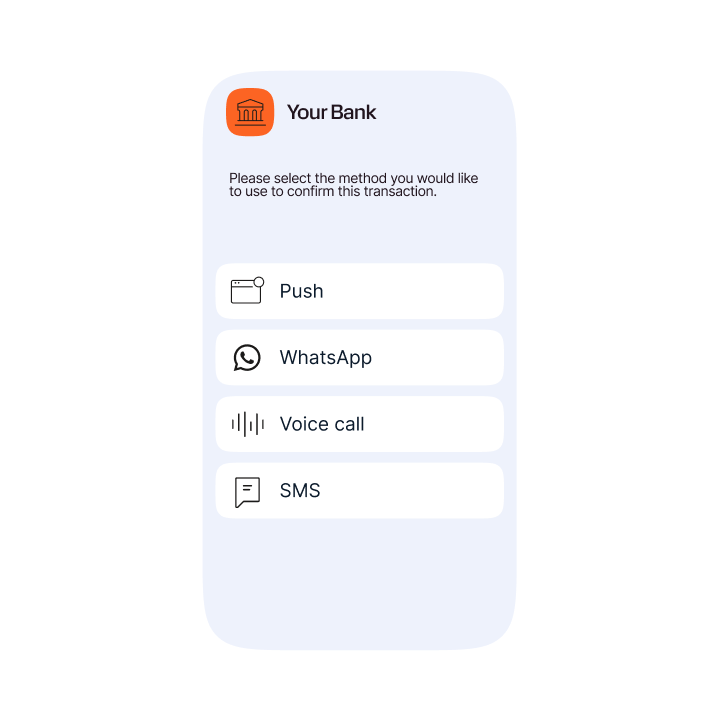
Here is a simple example of a 2FA process where customers can choose the channel they want to use for authentication:
Step 1: Users initiate the 2FA process and choose which channel they want to receive their 2FA code on.
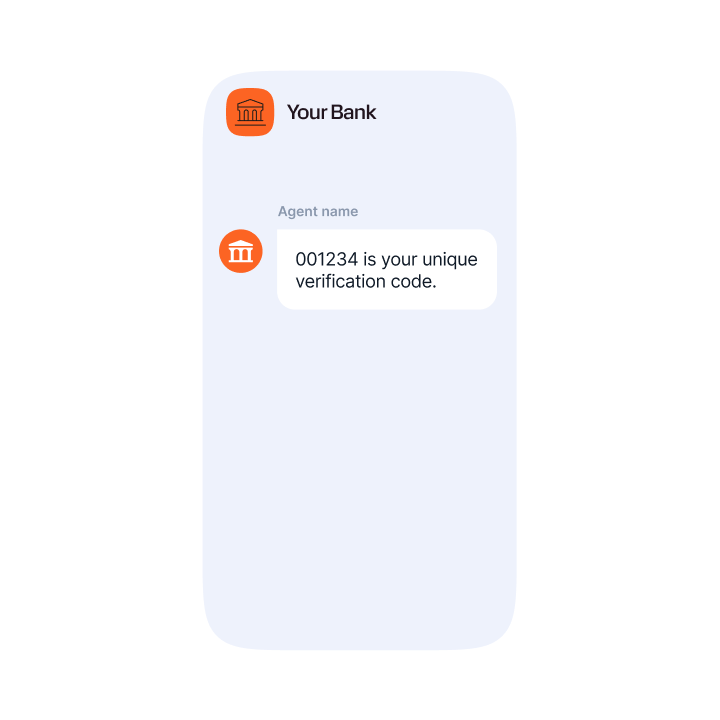
Step 2: After choosing the channel, users receive their verification code.
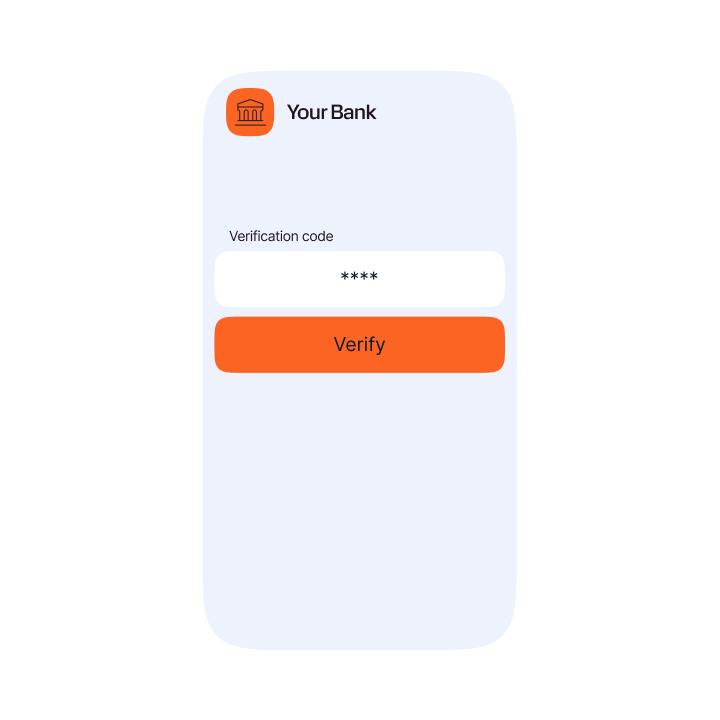
Step 3: Users enter the verification code in the app or web, authenticating the transaction.
5 benefits of 2FA
The main benefit of 2FA is that it provides an extra layer of security, making it harder for attackers to access accounts. Simply adding a layer of 2FA to logins and transaction processes can alleviate risks of stolen data. Fraud & Security Trends Report reinforces why this matters: In 2025, phishing accounted for 49% of all blocked harmful content, meaning nearly one in every two blocked messages was a phishing attempt. At the same time, phishing volume grew 94% year on year.
As a method of multi-factor authentication (MFA), it helps ensure online accounts and transactions are safe from fraudsters’ many tactics, including email phishing, and smishing. Google reported that 100% of automated bots, 99% of phishing attacks, and 66% of targeted attacks were blocked by two-factor authentication.
Here is an overview of the benefits of 2FA in more detail:
1. Stronger security
It’s not easy for a hacker to bypass 2FA, making it an effective security tool against fraud. Hackers would have to know lots of information to gain access and duplicate information, not just one password.
Turning on two-factor authentication is an easy way to stay protected. Even the simplest form of 2FA puts a practically impenetrable wall between hackers and your customers’ personal information.
Taking these steps to protect your customers’ accounts will offer them the highest level of security and the best UX, creating happy and secure customers all around.
2. Improved user experience
The goal of 2FA is to secure personal information while still providing a smooth user experience. In the case of push notifications, there’s no need to enter a PIN to confirm the authentication. A simple click is all that’s required.
Tip: Using an omnichannel 2FA solution, you can allow customers to choose the channel that best suits them, putting UX and security first. Messaging Trends Report shows 97.7% of traffic now comes from customers using two or more channels. In practice, 4-channel customers generate 25% of traffic and 5-channel customers 20%, so users are already moving across channels.
3. Increased productivity and flexibility
Companies that embrace new technology are likely to experience better productivity and flexibility. Customers can sign up for services faster and more securely than before.
Today, businesses use 2FA so their employees can securely access corporate applications, data, documents, and back-office systems from virtually any location without putting company data at risk.
4. Lower security management costs
Implementing 2FA can help reduce the lengthy and costly password reset calls and can act as a secure way for customers to sort these issues out themselves.
Reducing customer interactions with call centers, not only strengthens security but also improves UX. Then, as a massive bonus, operational overheads that are associated with security controls are reduced.
5. Improved customer trust
Having stronger security measures for ecommerce sites increases consumers’ trust. Consumers are more likely to trust other consumers on sites like eBay or PayPal knowing that everyone on the system must pass through the same tight security as they did. Building a large circle of trust within the community, especially with services like eBay and Etsy, is essential to these services’ long-term success.
Example use cases for 2FA
1. Banking & finance
It is common and crucial for banks and financial institutions to use 2FA services. From requiring a PIN to access your bank card, to a TOTP (time-based one-time password) to finalize money transfers, 2FA keeps customers’ banking information safe and secure.

2. eCommerce
Online retailers often use 2FA during the login process. When credit card information can be saved and stored on their accounts, adding an extra layer of protection is essential for customers to feel safe buying from their sites.
3. Healthcare
Healthcare organizations are responsible for securing patient data and information. Using 2FA, they can reassure their patients that only they can access their medical records. 2FA is also required for doctors to access patient files.
4. Government
Governments have had to shift to using online and cloud-based platforms for people to access their government accounts. This can include anything from student loan accounts, retirement savings, applications for driver’s licenses, and other government services.
How to implement 2FA effectively
If you’re looking at how to set up 2FA, OTP (PIN code) delivery to a mobile device is the most common implementation method.
However, it is crucial to choose the best channel for sending the PIN depending on the individual use case and each customer’s preferences.
That flexibility matters because SMS still accounts for 62% of business messaging traffic, while email grew 168% globally in 2025 and RCS grew 311% globally, so a channel mix can help OTPs reach users even when one route is unreliable. (Source: Messaging Trends Report)
For example, some people may live or work in places with unreliable mobile or data signals. So, configuring a failover channel is key to ensuring that codes are delivered securely and before they expire in cases where time-based one-time PINs (TOTPs) are used.
The most popular methods of 2FA include:
- SMS 2FA
- Email 2FA
- RCS 2FA (OTP)
- Voice 2FA (OTP)
- Sending OTPs via chat apps like WhatsApp, Viber, Zalo, KakaoTalk and others.
You should ensure 2FA is used as effectively and efficiently as possible to ensure your customers do not get inconvenienced and associate increased security with increased hassle.
An effective authentication solution should be able to automatically select the best primary and failover channel and trigger delivery of the OTP on the second channel when the first is not successful. This ensures that 2FA PIN codes are always delivered.
This is where a flexible omnichannel authentication solution becomes crucial, as it reduces the overall overhead for the organization by ensuring that human intervention is only required when necessary.
How Infobip can help you with 2FA
At Infobip, we help businesses from global brands to independent retailers secure their customers and transactions. Our solution, Infobip Authenticate, is unique in the market as it incorporates multiple channels and analyses various factors, including cost and popularity, to determine the best channel for each OTP.
Infobip can also generate the two-factor authentication (2FA) codes, or PINs, that customers use to verify their identity. Through Infobip’s Two Factor Authentication Service (2FA Service), businesses can request a unique passcode to be generated for a customer and delivered directly to them. The customer then enters the received code into the business application to confirm their identity. This allows businesses to rely on Infobip not only for OTP delivery, but also for the generation and verification flow that supports secure customer authentication.
Infobip’s 2FA messaging solutions for OTP delivery include SMS OTP, RCS OTP, WhatsApp OTP, Voice OTP, Viber OTP, Zalo OTP, KakaoTalk, and Telegram. These channels ensure that your OTPs are always delivered promptly and reliably in every destination.
The solution is designed to blend seamlessly into existing business processes so that your customers benefit from an easy and consistent experience that reduces friction all the way from account registration to purchase.
Here are some of the brands that trust Infobip to help with their authentication challenges:
- Uber: Protecting customers with call anonymization and number masking.
- Leanpay: Helping to support a 20% month-on-month growth in registered users with two-factor authentication.
- Bukalapak: Improved user security AND increased delivery rates.
- Nickel: Simplified onboarding and cost optimizations with SMS 2FA solution.
- Yousign: Increasing one-time PIN (OTP) delivery rates to over 97% via SMS and text-to-speech (TTS) failover.
By implementing quality 2FA solutions, you are signaling to customers and users that you take security seriously. This is increasingly important as we trust more of our digital lives to online services.
FAQs about 2FA
2FA means Two-Factor Authentication. It is the meaning of 2FA in simple terms: a password plus a second verification factor, such as a code sent to a device. People often use the phrase “what is 2FA mean” when they are really asking what the extra verification step is.
2FA is considered very secure, if a person’s authentication device (mobile phone) is not lost or stolen. In this scenario, it is theoretically possible that it could be used to access an account or validate a transaction if the person in possession of the phone also knew the rightful owner’s login details and password.
To add even more layers of security, biometric checks can also be used, for example fingerprint, retina or face scans. Many modern smartphones already have biometric capabilities, although it can be quite challenging to integrate with every service. This is why solutions like SMS OTP are still dominant worldwide.
Authentication factors are pieces of information you need to gain access to an account or make a transaction.
The first authentication factor required is simple – your username and password. However, on their own these do not provide sufficient security as they can often be guessed or stolen when hackers access an organization’s database that stores this information.
This is where multi-factor (or multi-step) authentication becomes crucial. In the case of 2FA, it requires two factors of authentication to verify your identity before you can complete an action.
There are three main types of authentication factors:
- What you know: a password, a PIN, or an answer to a security question.
- What you have: something physically in your possession like a phone, credit card, or fob.
- What you are: a biometric such as a fingerprint, your voice, or a retina or face scan.
The most secure authentication solutions make use of multiple factors to suit each use case, and where OTPs are used – these can be sent on the best channel to ensure reliable deliverability and optimized costs for the organization.
A 2FA PIN is a code that is automatically generated and sent, usually to a mobile device, to allow a single login session or transaction. You can see an example in this chapter.
A 2FA code is a one-time verification code that is automatically generated and sent, usually to a mobile device, to allow a single login session or transaction. If you are comparing 2FA code meaning and 2FA PIN meaning, both point to the same second verification factor.